

Devlog #6 – Football Legends: Six Months of Unity Development
Looking back through the history of these six months, it’s interesting to see how much a project can change in a relatively short period of time. What started as a new foundation for Football Legends gradually grew to include screens, systems and tools, becoming something much closer to the game I have in mind.
Not all of the work has been about adding new features. A lot of time has also gone into connectivity, error handling, refactoring, performance and documentation. Some of these tasks are almost invisible to the player, but they have ended up being just as important as the new screens and features.
That’s why I think it’s worth taking a moment to go through the development month by month, looking not only at what was added, but also at how the focus of the project changed throughout this period.
January · Building the foundations
Development began by building much of the infrastructure that Football Legends needed. During this month, I built the registration flow, integrated Google and Firebase, and started connecting Unity to the server to retrieve real information about the team and its division.
I also started creating the first reusable UI Toolkit components and defining the overall structure that future screens would be built around.
It was a month of a lot of internal work, but it was essential for giving the rest of the project a solid foundation to grow from.
📌 Milestones:
- First version of the Unity project.
- New user registration flow.
- Google/Firebase integration.
- Initial server communication.
- Dynamic data for team registration.
- First reusable UI Toolkit components.
- Initial authentication testing on devices.
February · Connectivity and stability
February was much more focused on making the application robust.
A new connection management system was developed, including server checks, connection loss detection and automatic reconnection. I also created the Network Overlay to inform the user about network problems and improved the logging system.
Towards the end of the month, the visual structure of the main application also started to take shape.
It was a month with fewer visible features, but an important one for making sure the application could properly handle the kinds of connectivity issues you would expect from an online game.
📌 Milestones:
- New connection management system.
- Connection loss detection.
- Reconnection system.
- Server availability checks.
- Network error handling.
- Network Overlay for connection issues.
- Improvements to the logging system.
- Connection support during Unity Editor testing.
- First structure for the main interface.
March · The game starts to take shape
In March, Football Legends started to feel much more like a football management game.
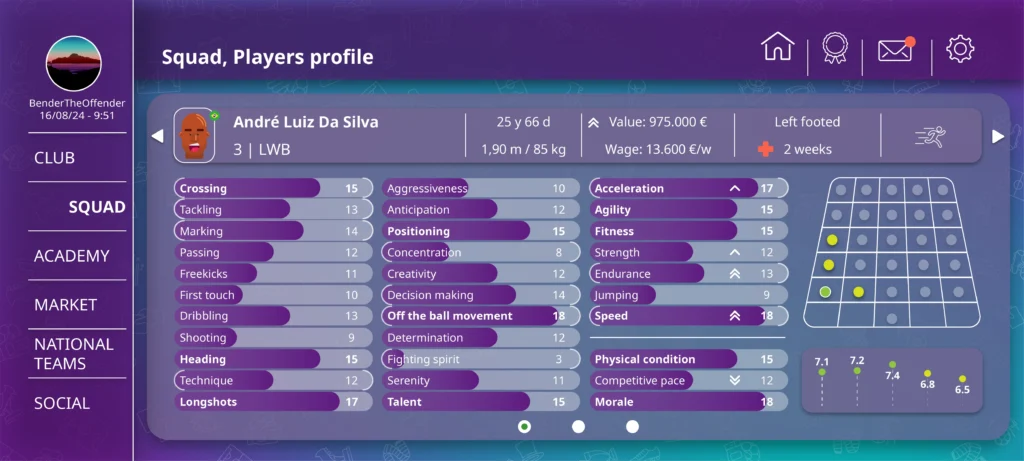
Office and Squad began evolving into functional screens connected to real data. The squad started displaying more detailed player information, including position, age, nationality and other localised data.
Another of the project’s most distinctive systems also appeared: dynamic player faces. The different facial elements are downloaded, cached and combined to generate each player’s appearance from data provided by the server.
From this point onwards, the different parts of the project really started working together.
📌 Milestones:
- First functional evolution of Office.
- Development of Squad.
- Detailed player information.
- Positions, ages and nationalities.
- Dynamic flags.
- Progressive localisation integration.
- First dynamic player face system.
- Face downloading, composition and caching.
- Greater integration between server data and UI.
- First connected screens.
April · Player Profile and the transfer market
April was mainly focused on the development of the Player Profile screen.
Players now had their own screen with more detailed information, attributes and new management options. I also added the Radar Chart to compare player attributes and started working on player market status, including players available for transfer and loan.
The market also began to connect with Squad and Player Profile, taking the first steps towards a more complete squad management experience.
During this month, I also installed BookStack and started using it as the project’s internal documentation system. As the number of systems grew, having somewhere to store and refer back to this information became increasingly useful.
📌 Milestones:
- New Player Profile system.
- Detailed player information.
- Individual attributes and statistics.
- Player comparison using a Radar Chart.
- Shirt number selection and management.
- Player market status.
- First transfer and loan operations.
- Market integration with Squad.
- New market service and data structures.
- BookStack installation.
- Start of the project’s internal documentation.
- New reusable components for forms and UI.
May · Organising things for future growth
After several months of adding new systems, May was mainly a month of reorganisation and improvement.
Player Profile received a major refactor: the market, shirt number, injury and Radar Chart (player comparison) logic was separated into independent components. Squad also received interaction and performance improvements.
One of the most interesting changes was the preloading of player faces, preventing faces from having to be downloaded and composed while navigating through the squad.
I also created the Settings screen, with language selection and light/dark themes.
It wasn’t the month with the most visible new features, but it was one of the months that did the most to prepare the project for what comes next.
📌 Milestones:
- Major Player Profile refactor.
- Separation of market, shirt number, injury and Radar Chart logic.
- Improved Squad interaction.
- Improvements to scrolling and player selection.
- Player face preloading and caching.
- Reduced visible loading and asynchronous issues.
- New Settings screen.
- Integrated language selector.
- Persistent preferences.
- Initial light/dark theme system.
- Style refactoring.
- Localisation fixes.
- General improvements to architecture and maintainability.
June · The club starts to take shape
In June, the focus began to shift from the player towards the club and the manager.
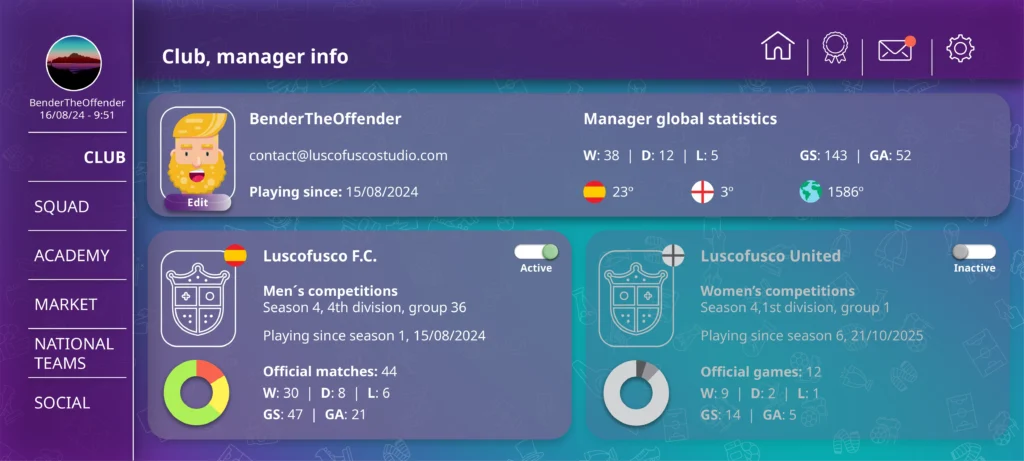
Club Manager was developed, incorporating team information, registration date and new customisation elements. I also created a system to dynamically generate the user’s avatar and another to build team crests.
Office also started using real information about upcoming opponents and fixtures, displaying their crests and preparing a more complete view of the fixture schedule.
Although it was a month with fewer commits, several of the features developed were important for expanding the experience beyond the squad itself.
📌 Milestones:
- New Club Manager screen.
- Club information and registration date.
- User appearance system.
- Appearance downloading and caching.
- Dynamic team crest system.
- Shield Composer and Shield Cache.
- Opponent information.
- New endpoint for upcoming opponents.
- Expanded fixture schedule.
- Opponent integration in Office.
- Dynamic team crests across the screens.
- Full Club Manager localisation.
- Visual improvements and asset fixes.
Looking ahead
Looking back at these six months as a whole, it’s interesting to see that the development has followed a much clearer path than it seemed to while it was happening.
First, I had to build the foundations. Then I needed to make sure the application could connect reliably and recover from network problems. After that came the first truly functional screens, squad management and the beginnings of the transfer market. Gradually, the focus started to expand from the players towards the manager and the club itself.
Many of the decisions made during these months don’t have a particularly striking representation in a screenshot. Refactors, reusable systems, performance improvements, internal documentation and development tools aren’t exactly the most visible parts of making a game, but they become increasingly important as the project grows.
I also think it’s interesting that the result of these six months is more than just a collection of new screens. The different parts are beginning to depend on each other and form a single system. Players have their own data, that data appears in the squad, individual players can be viewed in detail, they are starting to become part of the transfer market and, ultimately, all of this belongs to a club that the user can manage.
There is still a huge amount left to do, and there will probably be more changes of direction, refactors and problems along the way. But reaching this point allows me to look at the project differently from how I did back in January.
Football Legends is no longer just a foundation to start building on.
Little by little, it’s starting to become the game I wanted to build.